

Overview
Available in the Tools section of Thurro Answers, CCI helps analysts track, navigate, and analyse company earnings calls more efficiently.
CCI combines live call monitoring, transcripts, structured summaries, and alert management into a single interface, allowing users to follow earnings season without manually tracking multiple conference calls.
With CCI, you can:
- Join live conference calls
- Navigate transcripts using AI-generated summaries
- Access instant playback of completed calls
- Generate custom summaries using templates
- Set alerts for upcoming calls
These capabilities allow analysts to stay on top of earnings season while reducing the time required to monitor and summarise conference calls.
Live Call Advantage
CCI allows you to follow conference calls while they are happening.
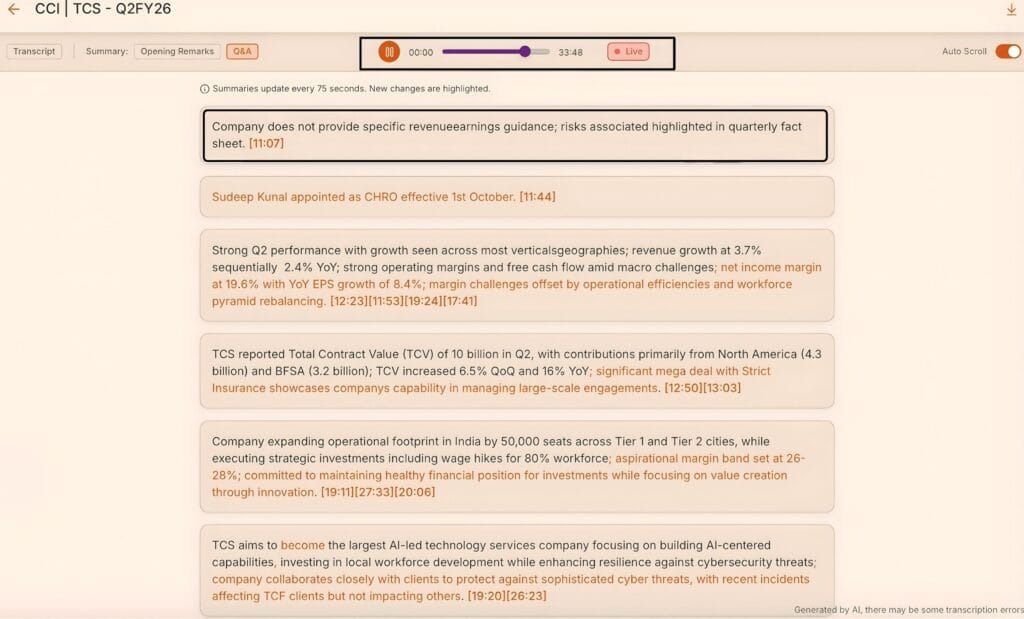
On the Conference Call page, the Live tab displays all calls currently in progress.
When you open a live call, you can:
- Listen to the live audio stream
- Follow along with the real-time transcript
- Navigate the transcript to review earlier parts of the discussion
If you join a call late, you can move through the transcript and play audio from an earlier point in the call.
You can also turn off Auto Scroll to manually navigate the transcript and replay audio from any specific point in the call.
This ensures you never miss important commentary even if you join midway.
Smart Section Navigation
During a conference call, CCI automatically generates section-wise summaries to make navigation easier.
The platform divides the call into two key sections:
- Opening remarks
- Question and answer discussion
Summaries are generated in real time and updated approximately every 75 seconds as the call progresses.
New updates are automatically highlighted so users can quickly identify changes in the discussion.
This allows analysts to quickly understand the key points without reading the full transcript.
Instant playback for completed calls
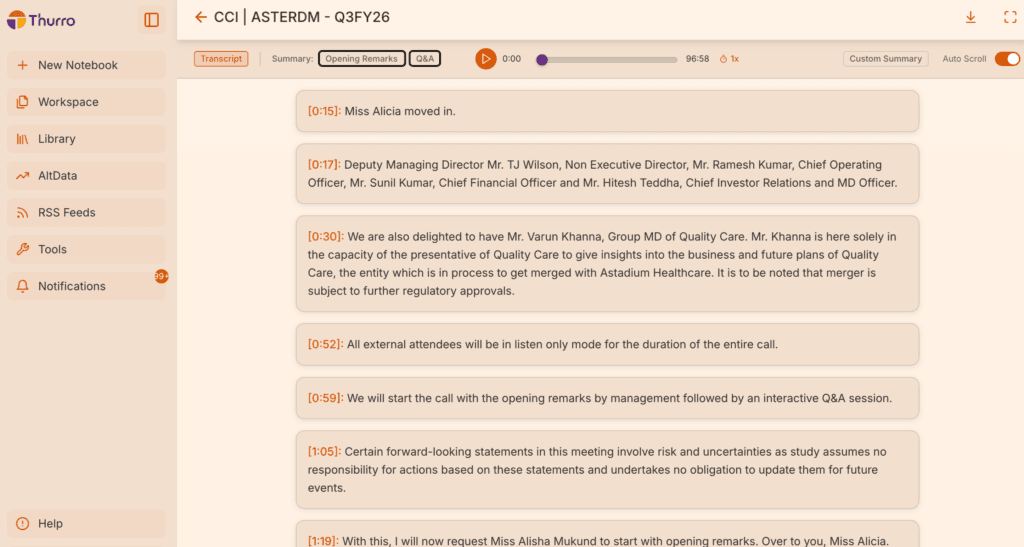
Once a conference call ends, the transcript and audio playback become immediately available.
You can review completed calls by:
Clicking timestamps in the transcript
Using the audio playback bar
Section-wise summaries remain available for both:
- Opening remarks
- Question and answer discussion
This makes it easy to revisit key insights or analyse specific management commentary without replaying the entire call.
Custom summary for completed calls
CCI allows users to generate customised summaries of conference calls using pre-defined templates.
This feature helps analysts extract specific insights based on their research framework.
To generate a custom summary:
- Open a completed conference call
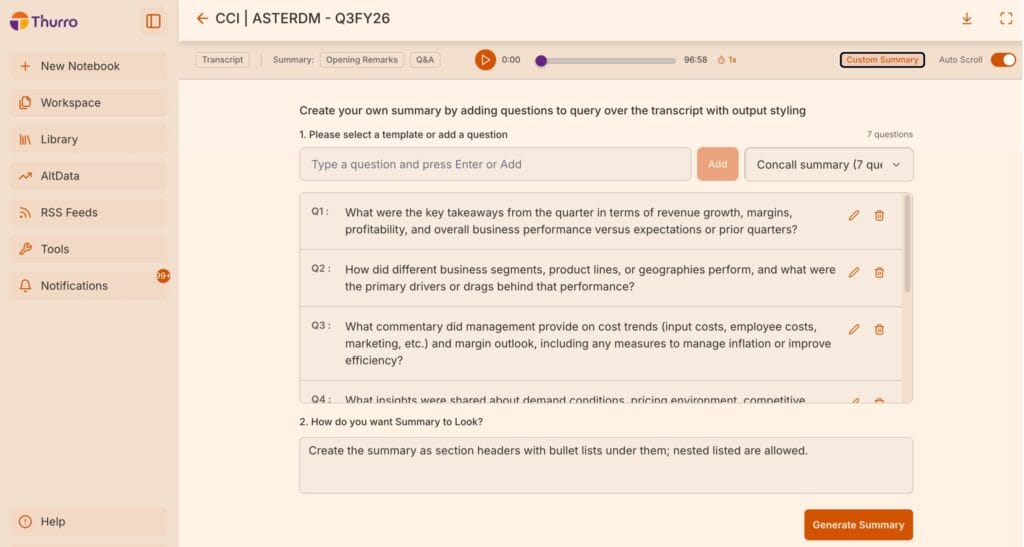
- Navigate to the Custom Summary panel
- Select a summary template
- Generate the summary
Templates contain pre-defined questions that guide the summary generation.
For example, a template for technology companies may include questions about:
- Product strategy
- Revenue drivers
- Margin trends
- Management commentary on growth
Users can also edit questions or add new ones before generating the summary. If needed, the summary can be regenerated after modifying the template questions.
The output format can be customised to include:
- Section headers
- Bullet points
- Structured summaries
Generated summaries, transcripts, and audio files can also be downloaded for further use in reports, research notes, or internal communication.
Creating custom summary templates
Users can create their own conference call summary templates to ensure consistent analysis across multiple calls.
To create a template:
- Navigate to Tools → Templates
- Select the Conference Call Templates tab
- Create a new template
- Add the questions you want answered
- Define the preferred output style
While creating the template, you can toggle the option to save it specifically as a conference call summary template.
Once saved, the template will be available for use when generating summaries in CCI.
This allows analysts to apply the same analytical framework across different earnings calls.
Automated call alerts
CCI includes an alert management system to help you track upcoming conference calls.
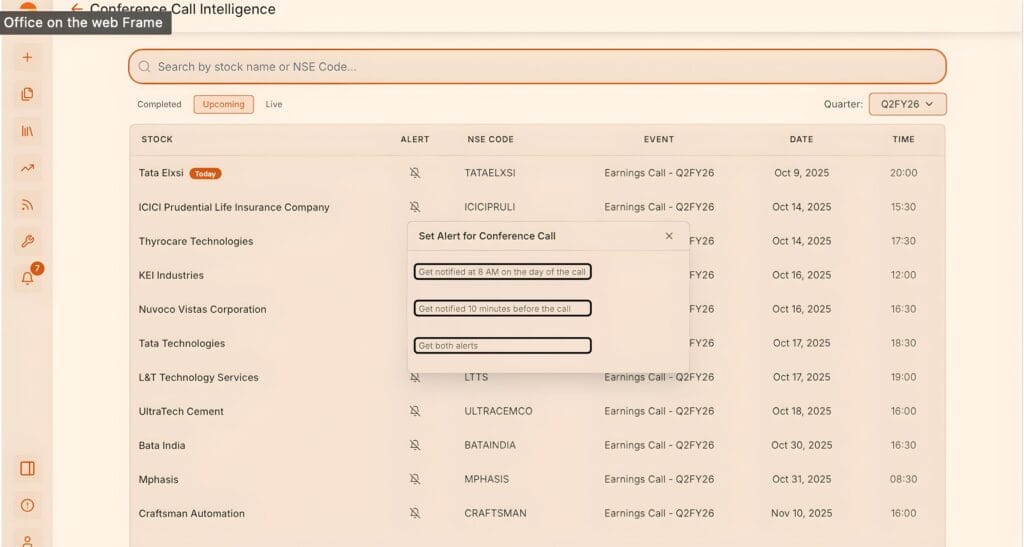
You can set alerts for calls you want to follow.
Available alert options include:
- Notification at 8 a.m. on the day of the call
- Notification 10 minutes before the call begins
Once alerts are created, they appear in the Alert Management section under Tools, where all conference call alerts can be viewed and managed.
This ensures analysts receive timely reminders and never miss important earnings calls.
Why use CCI?
Conference Call Intelligence simplifies earnings season by bringing live monitoring, transcripts, summaries, and alerts into a single workflow.
Using CCI, analysts can:
- Follow live earnings calls without missing key information
- Navigate long transcripts quickly using summaries
- Generate structured call summaries automatically
- Standardise analysis using custom templates
- Stay informed with automated call alerts
CCI helps analysts stay on top of earnings season while significantly reducing the time required to review conference calls.